One memory for every AI on every machine you own.
SessionVault keeps every Claude, Codex and Kimi session, plus your ChatGPT history, in one searchable vault on your own hardware. The next AI on any computer starts where the last one stopped.
- Works offline on your network
- Self-hosted: your data, your hardware
- Never deletes your data
- Software $99/year
See SessionVault in use
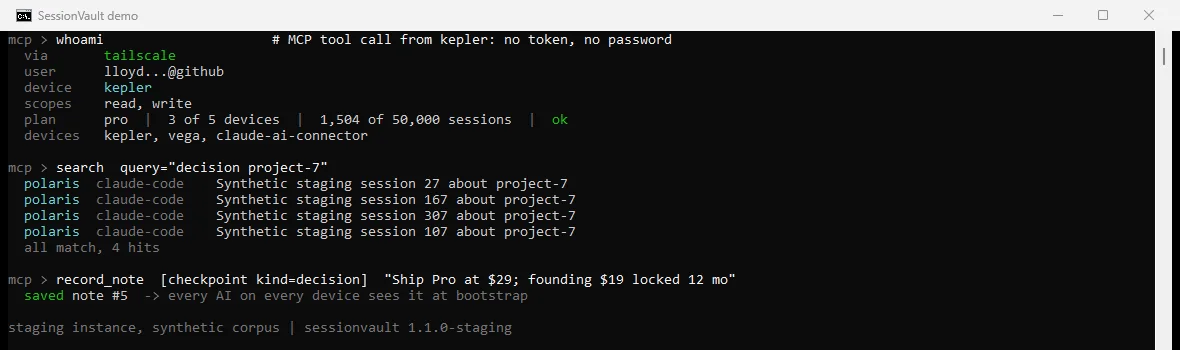
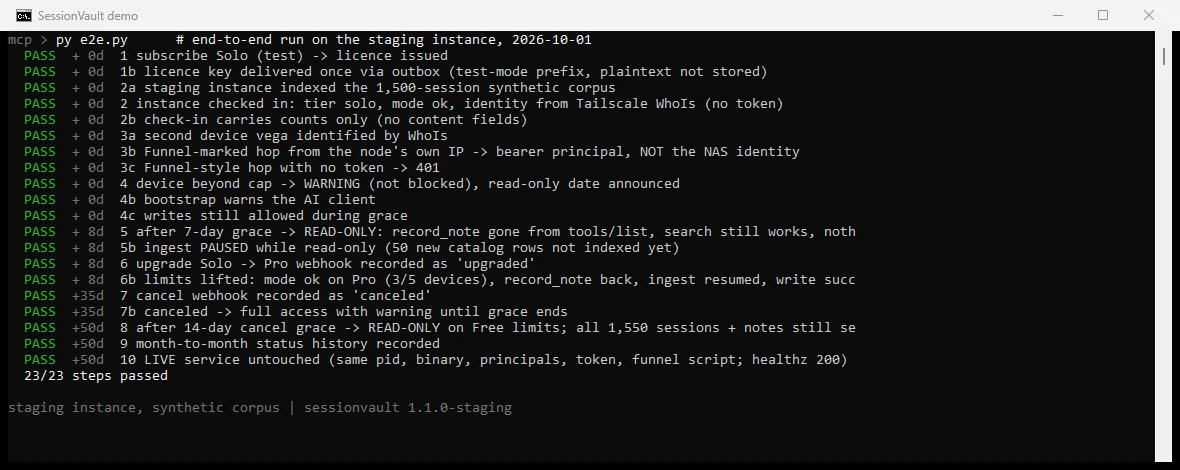
Staging screenshots with synthetic examples. Open either image for a closer look.
How the memory flows
AI writes: checkpoints, handoffs, sessionsAI reads: bootstrap, search, recall
Private connectivity
SessionVault + Tailscale
Your AI memory stays on your hardware. Tailscale connects your approved devices to that vault across locations, so you can pick up your work from another computer on your own private network.
One Windows package
Our engineering preview bundles SessionVault, its runtime and the official Tailscale client in one installer. Setup reuses Tailscale when it is already installed. You sign in to your own Tailscale account.
Your devices. Your vault.
AI apps connect through Tailscale to SessionVault on your PC, server or NAS. Tailscale provides private network connectivity; SessionVault stores and retrieves your AI history. Vault access keys remain a separate layer of access control.
Next: embedded connectivity
We are exploring Tailscale’s tsnet library to bring private networking directly into SessionVault, with a guided sign-in experience. Embedded tsnet is planned; the current preview uses the standard Tailscale client.
Windows preview: package integrity verified; clean-device installation, browser sign-in and two-device acceptance testing are still pending. Integration work is in progress; no formal Tailscale partnership is announced.
Proof, not promises
Five AI apps, one memory, every day.
Sessions by AI app in the live SessionVault index that GXT runs on its own machines, as of Oct 1, 2026. Nothing here is a mock-up.
Source: SessionVault stats tool, read Oct 1, 2026. Counts include notes.
How it works
Three steps. Then every AI shares one memory.
Install once In testing
One installer wires SessionVault into Claude Desktop, Claude Code, Codex and Kimi. It keeps your key in the OS keychain, checks itself before touching a config, and uninstalls cleanly.
Connect your devices In testing
Connect your AI apps to your private vault. Device sign-in is in testing; individual revocable access keys are also supported.
Work as usual Live
Each AI calls bootstrap at the start, searches before it asks you anything, and leaves a checkpoint when it finishes. The next AI, on any machine, picks it up.
What you get
Built for people who use more than one AI on more than one computer.
Every AI, one memory Live
Claude Desktop, Claude Code and Cowork, Codex, Kimi and local models through LiteLLM all read and write the same vault.
Every machine, one index Live
Sessions from each computer are swept into one index twice a day, so your laptop knows what your desktop decided this morning.
Bring your history Live
Drop in ChatGPT, Claude, Gemini, Copilot or Kimi exports. Years of chats become searchable within about 15 minutes of import.
Checkpoints and handoffs In testing
Decisions, facts, open questions, to-dos, summaries and handoffs are saved per project, so a new chat resumes instead of re-asking.
Your hardware, your data Live
The vault runs on your NAS or PC. The only thing that ever leaves it is a monthly licence check: a key and two numbers.
Your phone, too Prototype
BoxAI, an Android AI on your own model, has read from and written to the same vault. It is a working prototype and is not yet available. See the BoxAI appliance.
Honest comparison
Where SessionVault wins, and where it doesn't (yet).
Each column was checked against the vendor's own public site on Oct 1, 2026. SessionVault is the one that spans every AI and every machine.
| Capability | SessionVault | Central Brain | Mem0 | Basic Memory | supermemory |
|---|---|---|---|---|---|
| Works with several AI apps | Yes: Claude, Codex, Kimi, local models | Yes: Claude Desktop & Code, Copilot, ChatGPT desktop | Partly: Apps built on its SDK; OpenMemory MCP | Partly: Any MCP client | Partly: API, plugins, MCP |
| One memory across all your machines | Yes: One vault for every device | No: One licence = one computer | Yes: Cloud | Partly: Cloud sync plan | Yes: Cloud |
| Imports past chats from other AIs | Yes: ChatGPT, Claude, Gemini, Copilot, Kimi exports | No: Not offered | No: No | Partly: Import tools | Partly: Connectors |
| Full-text search of every past session | Yes: Every session and note | Partly: Prepared files, not chat history | No: No | Yes: Notes | Partly: Partly |
| Structured checkpoints and handoffs | Yes: 6 kinds per project (client 2.0, in testing) | Yes: 5 note kinds + project brief | Partly: Automatic extraction | Partly: Structured notes | No: No |
| Data stays on your own hardware | Yes: Self-hosted on your NAS or PC | Yes: Local on each computer | Partly: Cloud; open-source self-host | Yes: Local Markdown (open source) | Partly: Cloud; self-host on Scale plan |
| Semantic (vector) search | No: Keyword full-text today | Yes: Local MiniLM | Yes: Yes | Yes: Yes | Yes: Yes |
| Indexes your documents (PDF, DOCX…) | No: Sessions and notes only | Yes: With optional OCR | No: No | Partly: Markdown | Yes: Yes |
| Desktop app | No: Installer + your AI apps | Yes: Windows, Apple silicon | Partly: Web dashboard | Yes: Desktop, mobile, web | Partly: Web console |
| Phone AI shares the same memory | Partly: Prototype (BoxAI, Android) | No: Desktop only | No: SDK/API only | Partly: Mobile access to cloud notes | No: API only |
| Entry price | $99/year (software) | $12 per computer | Free; $19 Starter | Free open source; $15/seat cloud | Free; $19 Pro |
Sources: Central Brain pricing, Central Brain setup guide, Mem0 pricing, Basic Memory pricing, supermemory pricing. Spotted something out of date? Tell us and we'll fix it.
Pricing
Your software. Your choice of setup.
SessionVault is $99 per year. Install it on your own hardware, choose setup help, or order a dedicated box from GXT.
Self install
Run SessionVault on your own hardware.
$99 /year
Annual software license
- Downloadable installation package
- Searchable AI history
- Checkpoints and recall
- Your data stays on your hardware
Remote setup
Get help installing and connecting your vault.
$149 one-time
Optional service · software sold separately
- Attended remote installation
- Help connecting your AI apps
- Import and connection checks
- Setup walkthrough
On-site setup
Hands-on installation at your location.
from $299
One-time service · software sold separately
- In-person installation help
- Hardware and network review
- AI app connection checks
- Scope and travel confirmed before booking
Optional hardware
GXT Box
$275.75 hardware only
A dedicated mini PC for SessionVault. Keep your AI history on hardware you own.
- Intel N95 processor
- 8GB DDR4 memory
- 128GB SSD storage
- Windows 11 Pro
SessionVault software ($99/year), setup, tax and shipping are separate. Hardware price is subject to supplier availability and confirmed before purchase.
All prices in USD. Hardware is separate from the software and setup prices above. On-site availability and travel depend on your location.
Waitlist only. Checkout is not open yet, and joining the waitlist does not charge you.
Trust
The rules we hold ourselves to.
Content never leaves
The monthly check-in carries exactly three things: your licence key, a device count and a session count. The licence server rejects anything else.
Nothing is ever deleted
Your vault lives on your hardware. Removing your saved sessions and notes is your decision.
Works offline
Everything runs on your network. If the licence server is unreachable, SessionVault keeps working for at least two weeks before it needs to check in.
Clear setup choices
Install it yourself, get remote help, or request on-site setup. Service scope is confirmed before booking.
Explore with PlayPage
Find an answer. Take a play break.
Explore SessionVault through product shortcuts, a prepared FAQ helper and three mini arcade games. Use the PlayPage button at the bottom of this page.
The helper uses prepared product answers. Game scores stay in this browser.
Learn about PlayPageFAQ
Questions people ask first.
Where does my data live?
On your hardware: a NAS, a home server or one of your PCs. Your AI apps talk to it over your private network. GXT never receives your sessions, notes or titles.
What does SessionVault send to GXT?
Once a month, a licence check with your key, how many devices used it and how many sessions it holds. That's all. The licence server rejects any other field, so content can't leak through it even by mistake.
Does it work offline?
Yes. Everything runs on your network. If it can't reach the licence server, it keeps working normally and then warns you; it only switches to read-only after 14 more days without a check-in.
Can I order a dedicated SessionVault box?
Yes. The GXT Box is $275.75 for a dedicated mini PC with Intel N95, 8GB DDR4 RAM, 128GB SSD and Windows 11 Pro. Software ($99/year), setup, tax and shipping are separate. Request a quote to confirm availability and your order total.
Is installation included?
The $99/year software license is for self installation. Optional remote setup is $149 one-time. On-site setup starts at $299 one-time, with scope and travel confirmed before booking. Software and hardware are separate from setup services.
How is the software billed?
SessionVault software is $99 per year in USD. Optional installation services are separate one-time charges. Checkout is not open yet; renewal and cancellation terms will be shown before purchase.
Is my data ever deleted?
Your vault is stored on your hardware. Removing your saved data is your decision.
How do my devices connect?
Your AI apps can reach your vault over your own Tailscale network. The Windows engineering preview includes the official Tailscale client in one SessionVault installer, with browser sign-in to your account. Embedded tsnet onboarding is planned. Individual revocable vault access keys are also supported.
Which AI apps work today?
Claude Desktop, Claude Code and Cowork, the Codex CLI, Kimi, and local models through LiteLLM. You can also import ChatGPT, Claude, Gemini, Copilot and Kimi exports.
How is this different from Claude's built-in memory?
Claude's memory covers Claude only and lives in your Anthropic account. SessionVault is shared by every AI you use, across every machine, and lives on hardware you own.
Is there a phone app?
BoxAI, an Android AI that runs on your own model, has read from and written to the same vault as a working prototype. It isn't available yet.
Stop re-explaining yourself to every AI.
Join the waitlist and we'll let you know when the software download and checkout are ready.
Join the waitlistWant it done for you? BoxAI
SessionVault inside a private AI box, with your phone as the remote. Buy a box or bring your own computer. Prototype